A Project Management System Built for AI Agents
How I built a lightweight, AI-native project management system using structured markdown, a real-time dashboard, and an AI backlog agent — all living inside my codebase.
My task management was a mess. Half the tasks lived in Trello, some were scattered across WhatsApp messages to myself, and the rest existed only in my head. Meanwhile my AI coding assistant had zero context about any of it. So I tried something different — I moved the entire planning system into the codebase as markdown files. Here's what happened.
The Problem With Traditional Project Management Tools
Every project management system has the same problem: the tool is disconnected from the actual work. Jira tickets live in a browser tab. The code lives in your IDE. The context lives in your head. And none of them talk to each other.
When I started using AI coding assistants seriously — tools like Cursor with long context windows — I realized something. These AI agents are remarkably good at understanding structured text. But they can't log into your Jira board. They can't read your Monday.com tickets. They can't check what's blocked, what's in progress, or what the acceptance criteria are for the task you're working on.
So I asked a simple question: what if the project management system lived inside the codebase itself?
Not as a YAML config buried in CI. Not as GitHub issues you have to tab away to read. As plain markdown files, structured with conventions that both humans and AI agents can parse, sitting right next to the code they describe.
The Architecture
The system has four components:
┌─────────────────────────────────────────────────────┐
│                    Codebase                          │
│                                                     │
│  knowledge/          → AI-readable documentation    │
│  planning/           → Epics, tasks, dependencies   │
│  planning/dashboard/ → Real-time web UI             │
│  agents/             → AI agent definitions          │
│                                                     │
│  .cursor/commands/   → Slash command triggers        │
└─────────────────────────────────────────────────────┘- Knowledge Base — structured documentation optimized for AI context windows
- Planning System — markdown-based task tracking with epics, tasks, and dependency graphs
- Real-time Dashboard — a web UI that reads the markdown files and renders them as an interactive board
- Backlog Agent — an AI agent you invoke with a slash command to create and manage tasks using natural language
Let me walk through each one.
1. The Knowledge Base
The knowledge/ directory is a structured documentation system. Every folder has an INDEX.md that acts as a table of contents. Every file follows a strict template with a header block, a “In This File” table of contents, and content sections.
knowledge/
├── INDEX.md                ← Root: lists all topic folders
├── CONVENTIONS.md          ← Meta-rules for maintaining the knowledge base
├── receipt-processing/     ← One folder per major system
│   ├── INDEX.md            ← Lists files in this folder
│   ├── 00-overview.md      ← High-level overview
│   ├── 01-upload-flow.md   ← Detail file
│   └── 02-ocr-pipeline.md
└── planning/
    ├── INDEX.md
    ├── 00-overview.md
    └── 01-dashboard.md
The key insight is that this knowledge base is optimized for AI context windows. Every file follows conventions designed to maximize information density:
- Tables and bullet points over prose — agents parse structured content faster
- “Key Terms” column in every INDEX table — so agents can find relevant files without reading them
- Source file references in every document — linking docs to the actual code they describe
- One fact, one place — reference other files instead of restating information
When an AI agent needs context about a system feature, it reads the relevant INDEX, finds the right file, and reads just that file. No searching through a wiki. No Confluence rabbit holes. No crawling through major parts of the codebase and wasting precious context window space. Direct, indexed access.
A Knowledge Agent maintains this system — it can create, update, and reorganize documentation following the conventions. It's triggered via a /knowledge-agent slash command in Cursor.
2. The Planning System
The planning/ directory is a lightweight Jira replacement using plain markdown. The hierarchy is simple:
planning/
├── INDEX.md              ← Lists all epics with status
├── CONVENTIONS.md        ← Format rules
└── {epic-name}/
    ├── INDEX.md          ← Task board: table + phases + dependency graph
    ├── 00-epic-overview.md
    ├── 01-first-task.md      ← Task file
    ├── 02-second-task.md
    └── 03-third-task.md
Three levels. That's it. Root → Epic → Task. No sub-tasks of sub-tasks. No 12-level hierarchies.
The Task Board
Each epic's INDEX.md contains a task table, a dependency graph, and execution phases grouping tasks into sequential batches:
| ID | Task | Status | Priority | Assignee | Estimate | Blocked By |
|---|---|---|---|---|---|---|
| EX-01 | First task | in-progress | critical | Alex | L | none |
| EX-02 | Second task | not-started | high | Alex | M | EX-01 |
| EX-03 | Third task | blocked | high | unassigned | M | EX-01 |
EX-01 ─┬──→ EX-02 ──→ EX-04 ──→ EX-05
        ├──→ EX-03 ────────────┘
        └──→ EX-07
The Task File
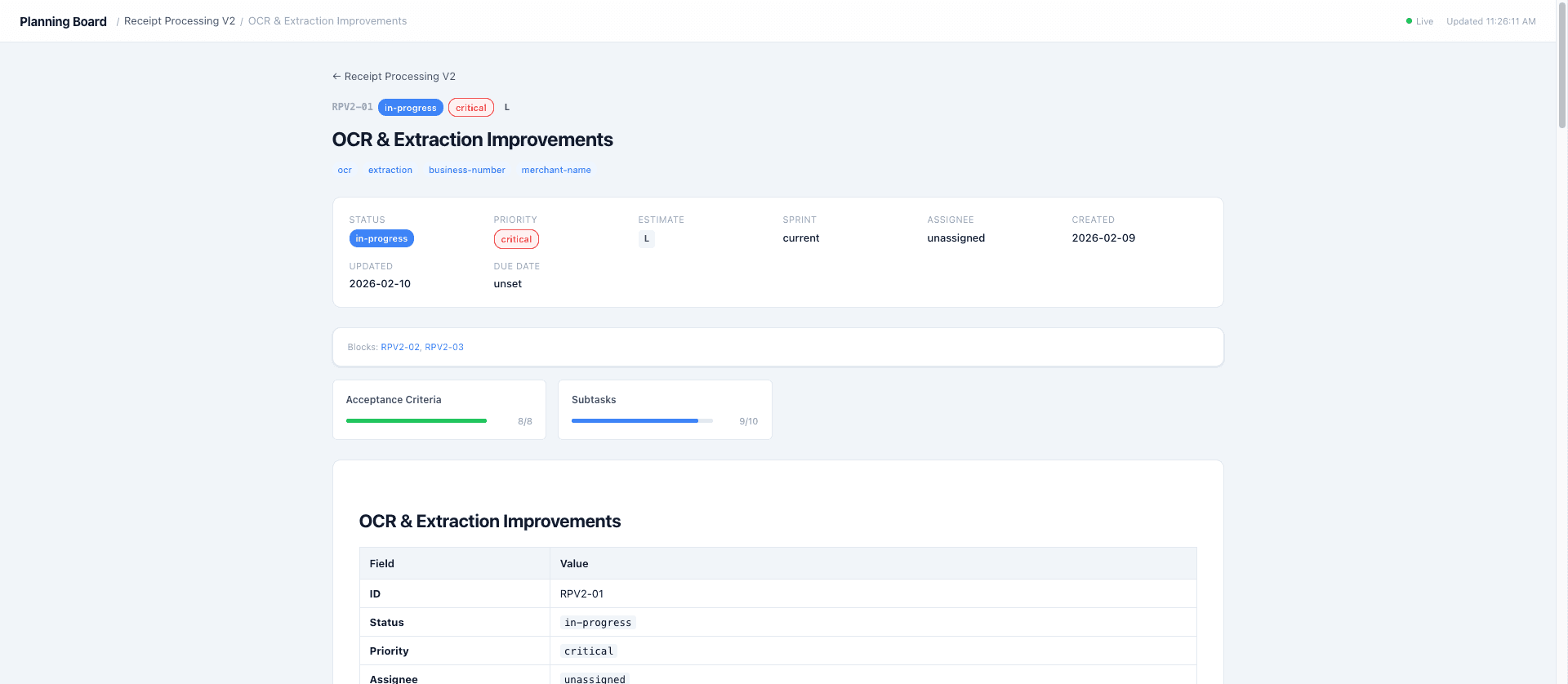
Every task file has exactly 13 metadata fields in a markdown table, followed by six mandatory sections: Current State, Target State, Acceptance Criteria, Implementation Notes, Subtasks, and References.
Acceptance criteria and subtasks use - [ ] checklists — making progress machine-trackable. An AI agent can parse a task file and tell you exactly what percentage of the work is complete.
Here's why this matters: the AI assistant working on your code can read the task it's implementing. It knows the acceptance criteria. It knows what's blocked. It knows the current state and target state. It has full context without you having to copy-paste from a Jira ticket.
Dependencies Are Symmetric
If task A blocks task B, both files reflect it:
- Task A's
Blocksfield lists task B - Task B's
Blocked Byfield lists task A
This constraint is enforced by convention and by the Backlog Agent. Dangling dependencies are never allowed.
3. The Real-time Dashboard
Markdown files are great for AI agents and developers working in their IDE. But sometimes you want a visual overview. So I built a lightweight web dashboard.
Stack: Express.js server + vanilla JavaScript SPA. No React. No build step. No bundler. Under 1,000 lines total.
planning/dashboard/
├── server.js       ← Express + SSE + file polling
├── parser.js       ← Markdown → structured JSON
└── public/
    ├── index.html  ← Shell page
    ├── app.js      ← Hash router + rendering
    └── styles.css  ← Responsive grid layout
How It Works
The server reads all markdown files from planning/, parses them into structured JSON using a custom parser, and serves the data via a single REST endpoint (/api/data).
The parser handles:
- Markdown table extraction (finds tables after specific headings)
- Metadata parsing (Field/Value tables → objects)
- Checklist counting (
- [x]and- [ ]→{ checked, total }) - Dependency graph extraction from code blocks
- Execution phase parsing
Live Updates via SSE
Here's the part I'm most happy with. The server polls the planning/ directory every 2 seconds, comparing file modification times against cached values. When any .md file changes, it:
- Re-parses all planning files
- Updates the in-memory cache
- Broadcasts an SSE (Server-Sent Events) message to all connected browsers
- The browser receives the event and re-fetches + re-renders
The result: I type /backlog-agent create a task for user onboarding in Cursor, the AI creates the markdown files, and the dashboard updates in real-time — within 2 seconds — without me touching a browser. It feels like magic.
The dashboard shows a “Live” indicator with a green dot when connected to the SSE stream, switching to “Reconnecting...” if the connection drops.
Views
The SPA has four hash-based routes:
| Route | View |
|---|---|
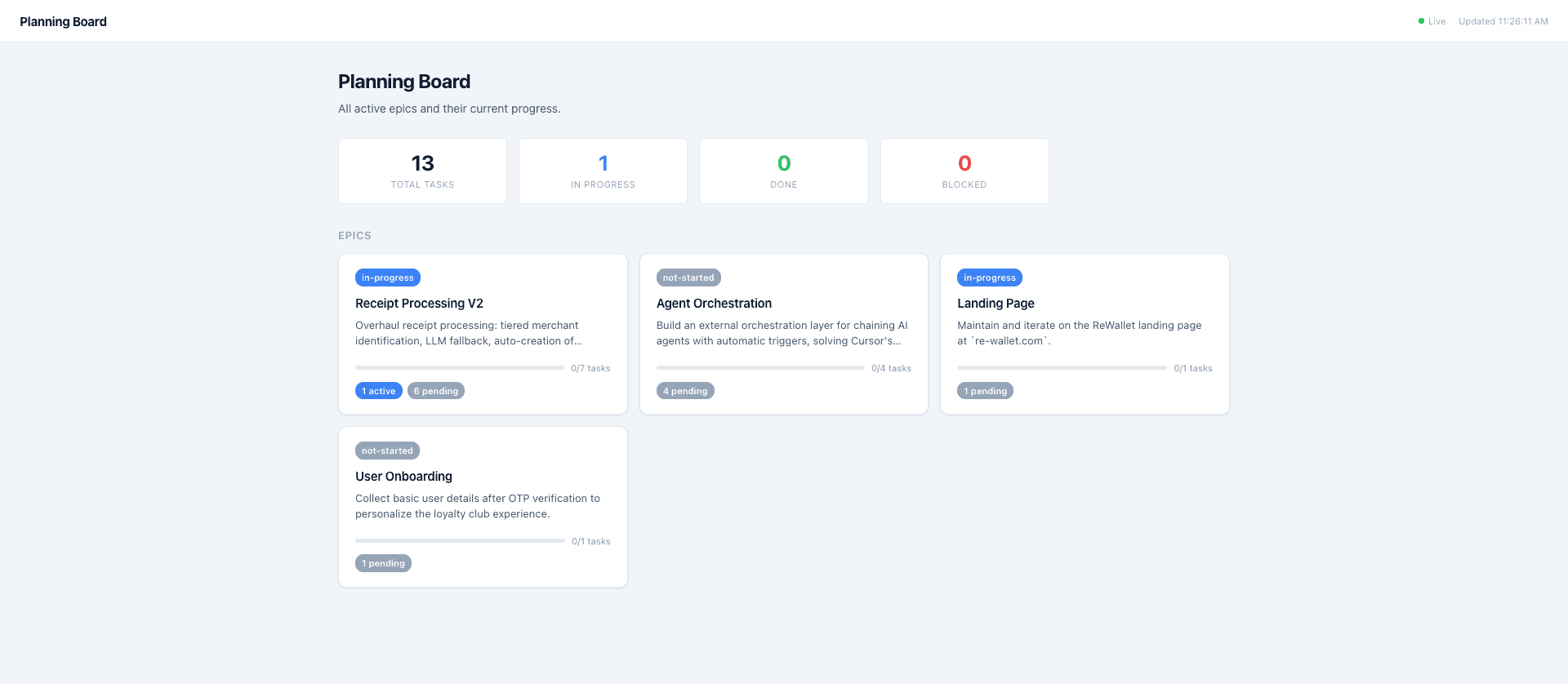
#/ | Overview — all epics as cards with aggregate stats |
#/epic/{name} | Epic board — stats, phase pipeline, dependency graph, task cards |
#/task/{epic}/{file} | Task detail — metadata grid, progress bars, rendered markdown |
#/doc/{epic}/{file} | Reference document viewer |
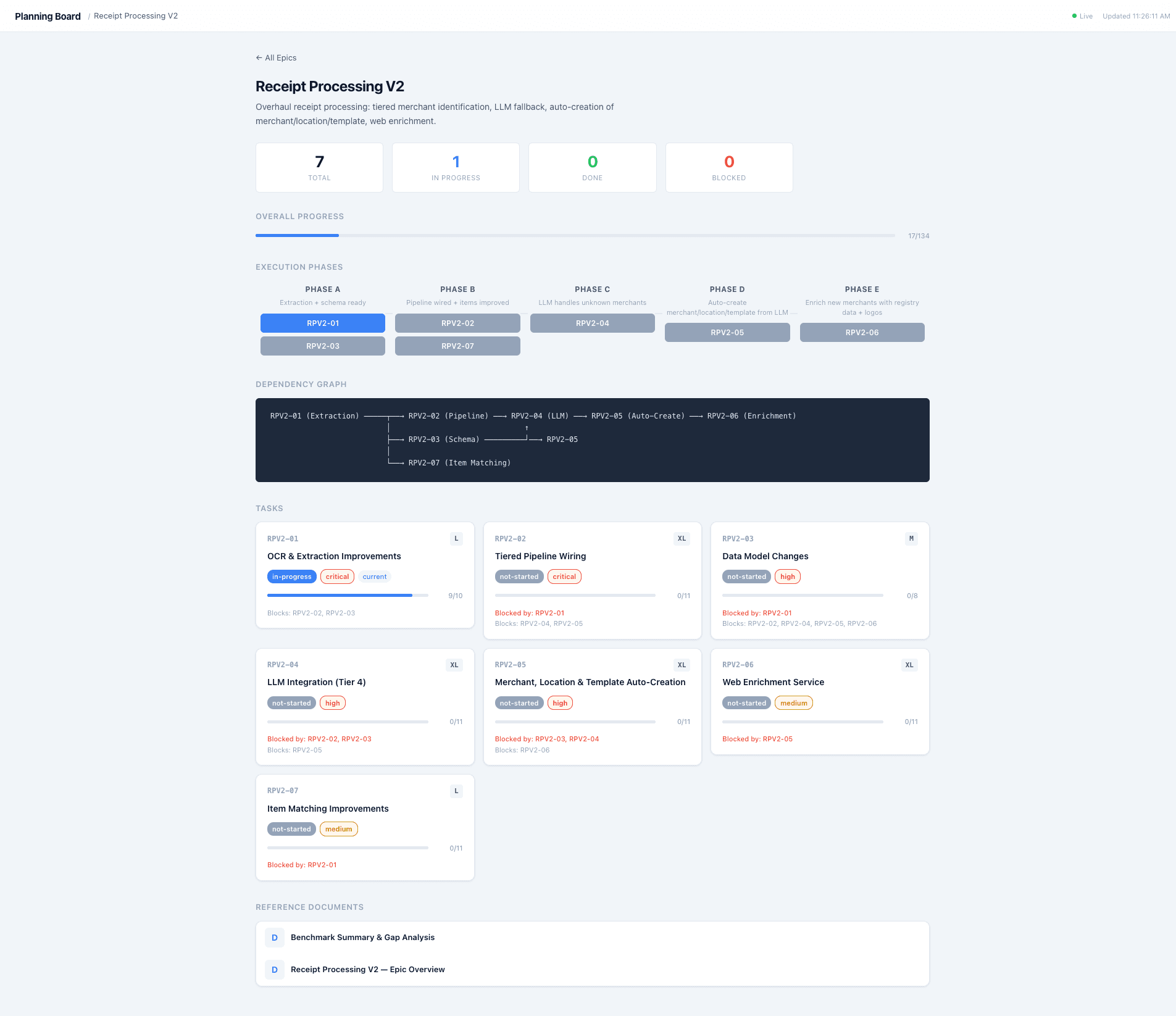
Each epic card shows progress bars, status counts, and task breakdowns. Task cards show color-coded status badges, priority indicators, estimate chips, and checklist progress.
Why Not a Real Framework?
I considered React or even a Notion-like tool. But this dashboard serves one purpose: visualize the markdown files. It doesn't need to be a product. It needs to render data that changes when files change. Vanilla JS + SSE does that in ~500 lines with zero dependencies beyond Express and a CDN-loaded markdown renderer.
Start it with npm start, open localhost:3200, done.
4. The Backlog Agent
This is where it all comes together. The Backlog Agent is an AI agent defined in a single markdown file — roughly 250 lines that describe:
- Role — what it owns and what it does
- Constraints — hard rules it must never violate
- Workflow — step-by-step procedure for every invocation
- Operations — supported actions (create epic, create task, update status, etc.)
- Templates — mandatory layouts for every file type
- Naming rules — file, folder, and ID conventions
When I type /backlog-agent in Cursor, the AI reads this definition file and becomes the backlog agent. It can:
- Create epics — new folder + INDEX.md + overview file + root INDEX update
- Create tasks — full metadata table + all sections + board update + dependency graph
- Update status — task file + epic INDEX, keeping both in sync
- Manage dependencies — symmetric updates across both blocking and blocked tasks
- Reorganize phases — update execution order when priorities shift
The Conversation Flow
Here's what it actually looks like in practice:
Me:
/backlog-agent Add basic user details collection after OTP
Agent:
Before I create the task, I need to clarify a few things. This doesn't fit into existing epics. Should I create a new one? What fields are we collecting? What's the priority?
Me:
New epic “user-onboarding”. First name, last name, birth date. High priority, due in a week.
Agent:
Here's what I'll create:
planning/user-onboarding/INDEX.md— epic task boardplanning/user-onboarding/00-epic-overview.md— epic overviewplanning/user-onboarding/01-basic-user-details-after-otp.md— task UO-01- Update
planning/INDEX.md— add epic row
Approve?
Me:
Yes
Agent:
Creates all files with full metadata, acceptance criteria, subtasks, and dependency graph
The agent asks targeted questions for missing information — it doesn't assume or fill in blanks. It proposes before writing — showing exactly which files it will create and what they'll contain. And it verifies after writing — confirming that INDEX files match task files, dependencies are symmetric, and dates are correct.
Three constraints that make this reliable:
- Never create tasks without all 13 metadata fields — no partial metadata
- Never leave dangling dependencies — both sides must reflect the relationship
- Propose before writing — always wait for approval
How It All Connects
The four systems form a feedback loop:
  Developer (IDE)                    Dashboard (Browser)
       │                                    ▲
       │  /backlog-agent                    │  SSE live update
       ▼                                    │
  Backlog Agent ──creates──→ planning/*.md ──┘
       │
       │  reads context from
       ▼
knowledge/*.md ◄──maintains── Knowledge Agent- I describe a task in natural language
- The Backlog Agent creates structured markdown files
- The Dashboard picks up the changes in real-time
- When I start coding, the AI assistant reads the task file for context
- When I learn something, the Knowledge Agent documents it
- The cycle continues
Everything is git-tracked. Full history of every task change, every status update, every planning decision. git blame on a task file tells you when and why a scope change happened.
What I Learned
Conventions beat features. The system works not because of clever code, but because of strict conventions. The 13-field metadata table, the symmetric dependency rule, the checklist-based acceptance criteria — these constraints make the data reliable enough for machines to parse.
AI agents need structure, not UI. An AI doesn't need drag-and-drop Kanban boards. It needs predictable file layouts with documented conventions. A markdown table is easier for an LLM to parse than a REST API response from Jira.
Zero infrastructure is underrated. No database. No auth. No deployment. npm start and you have a live dashboard. Files in your repo and you have a complete planning board. The entire system adds zero complexity to the development environment.
Real-time feedback changes behavior. Watching the dashboard update as the AI creates tasks made the system feel alive. It's the difference between “I should update the board” and the board updating itself as a side effect of the work.
Should You Build This?
If you're a solo developer or a small team already using an AI coding assistant — I think this approach has real legs. The total code is under 1,500 lines. The conventions are documented. The agents are defined in markdown files you can adapt to your project.
If you're on a team of 50 using Jira with enterprise workflows, probably not. This system trades features for simplicity. No sprint boards, no burndown charts, no Slack integrations. It does one thing: keep tasks structured, visible, and AI-accessible.
For me, the tradeoff is worth it. My AI assistant can read my tasks, my documentation, and my dependency graph — all without leaving the context window. That's a capability no SaaS tool offers today.
I'd Love to Hear From You
This system is still evolving, and honestly, some of the best improvements have come from rethinking assumptions. So I'm curious:
- How do you manage tasks alongside your AI coding assistant? Do you still alt-tab to Jira, or have you found something better?
- Would you use something like this? Is the tradeoff of simplicity vs. features worth it for your workflow?
- What would you add? Sprint velocity tracking? A CLI? GitHub Actions integration? I have ideas, but I'd rather build what people actually want.
If you're experimenting with AI-native workflows — whether it's agentic coding, structured knowledge bases, or anything in between — I want to hear about it. Drop a comment, DM me on LinkedIn, or just reply to this post. The best conversations come from people building in the trenches.
Any views or opinions expressed are my own.